
How to Build a Smart AI Assistant with Subagents on Assemblix
Introduction: why building an AI agent is a headache
Building an AI agent with subagents on the Assemblix platform solves the core problem: a single system prompt can't keep up with the variety of user requests. Customers report bugs, ask about pricing, raise general questions — and each request type needs its own handling logic. The traditional approach takes months of engineering: setting up vector databases, writing code for different scenarios, building monitoring. Every prompt change is a release, a code review, a deploy. And if you need to scale or switch AI providers? Even more work.
A real AI assistant isn't one agent — it's a system of agents and subagents, each responsible for its own area. A classifier identifies the request type, specialized agents handle specific scenarios, and conditional logic routes the data flow. Building this without a platform is a months-long engineering project.
What is Assemblix
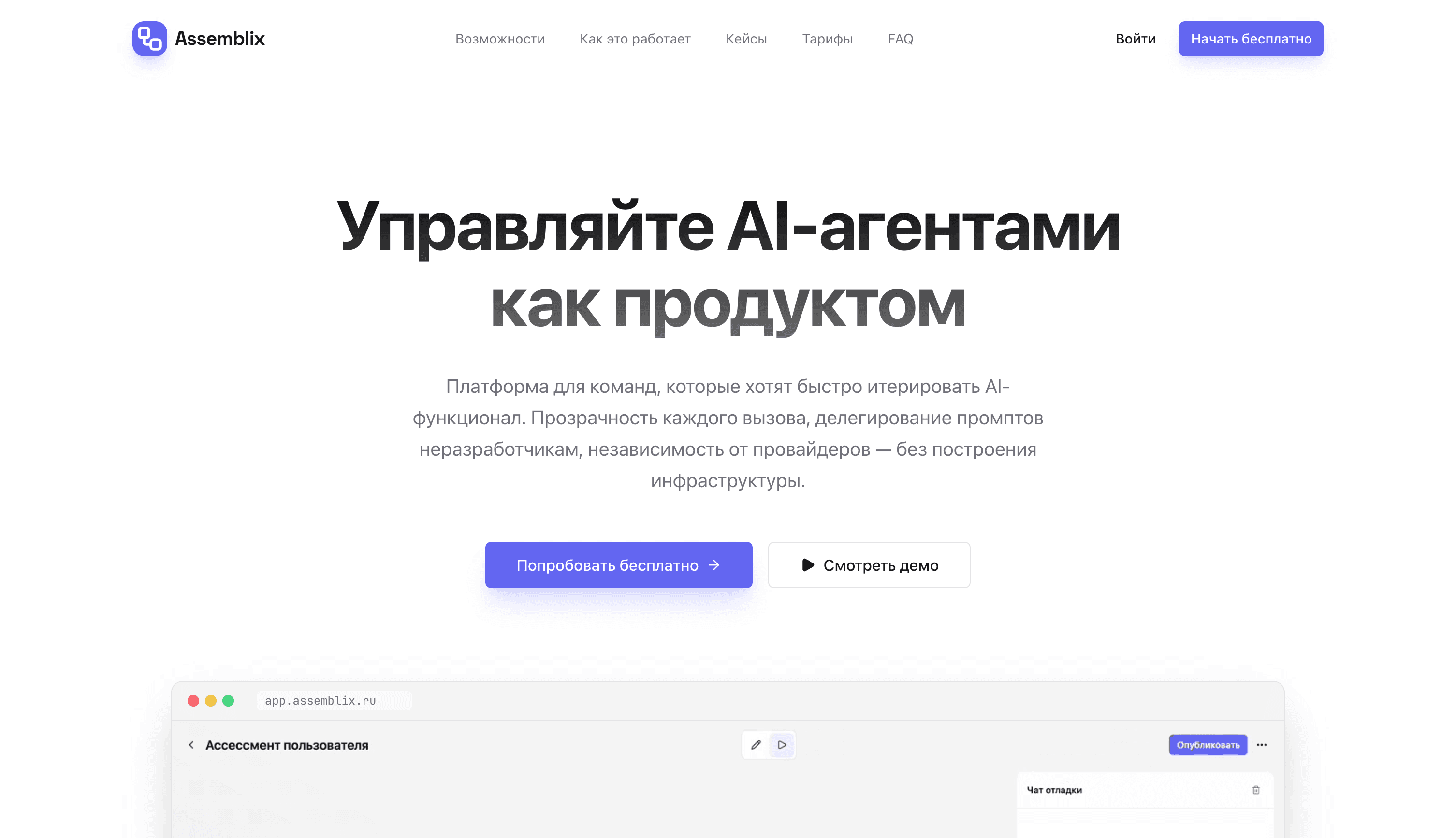
Assemblix is a platform for visually building and managing AI agents. Its positioning: "Manage AI agents like a product." Instead of writing code, you assemble a workflow from ready-made blocks like a builder set. Changed the prompt? Updates land in production within a minute, no release cycle. Want to know why an agent failed? You see every step: prompt, response, latency, cost. Need to swap OpenAI for Claude? One click. Learn more about the platform's capabilities.
💡 Key advantage
Assemblix uses built-in tokens. No API keys to wire up at the start — you get 1,000 credits free and start working immediately. On paid plans you can connect your own keys for unlimited usage.
Getting started
After signing up at app.assmblx.com you'll see the "Where shall we start?" modal. Assemblix offers ready-made agent templates or building from scratch:
- Knowledge assessment — an agent for testing users. It scores answers, keeps a tally, and finishes when the goal is reached
- Request routing — categorizes customer messages and routes them to the right specialist: positive, negative, or question
- Lead qualification — gauges lead temperature during the conversation and automatically pushes hot leads to your CRM
- Build from scratch — an empty canvas for your idea
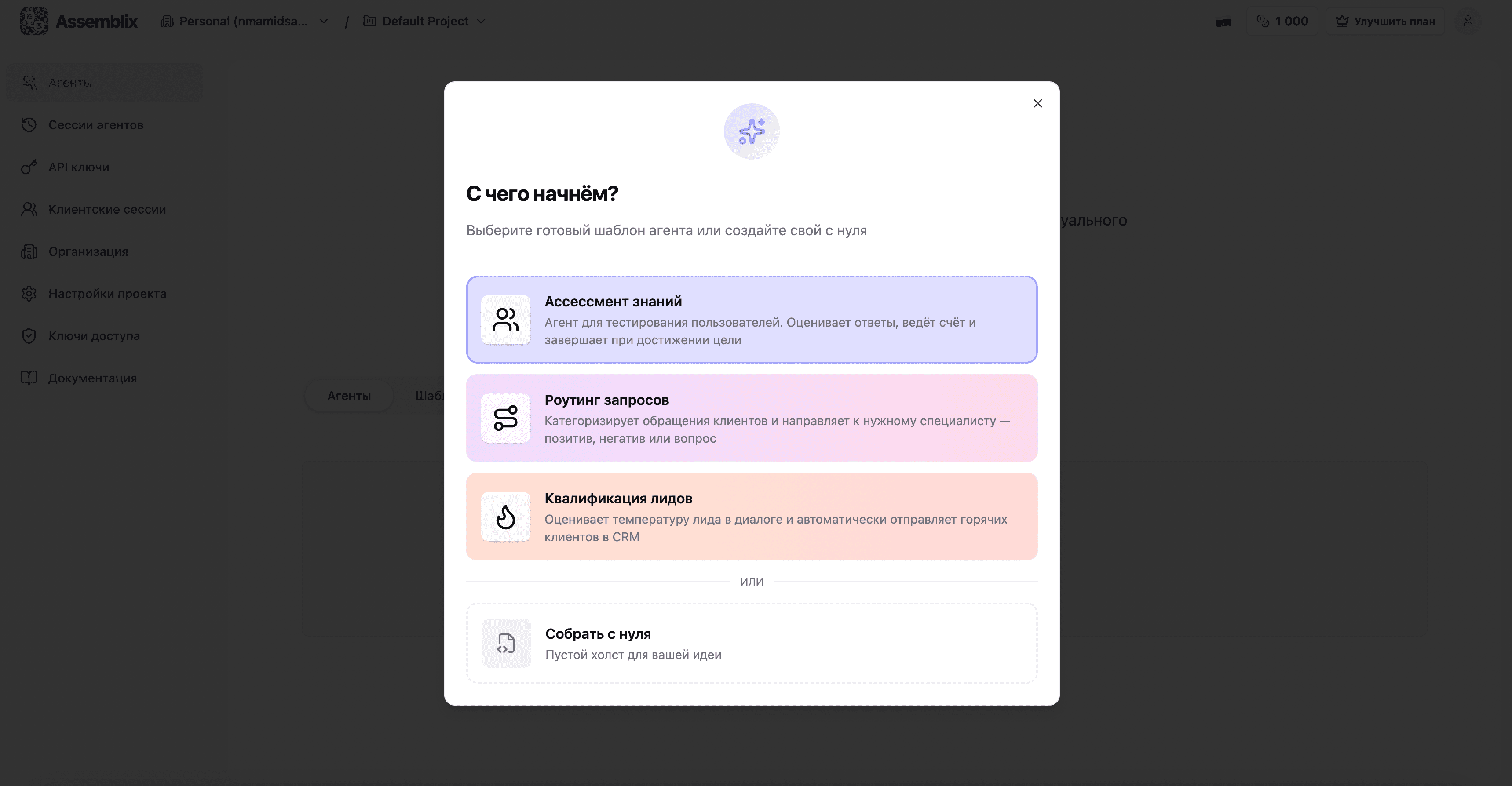
Pick "Build from scratch" and you land straight in the visual workflow editor.
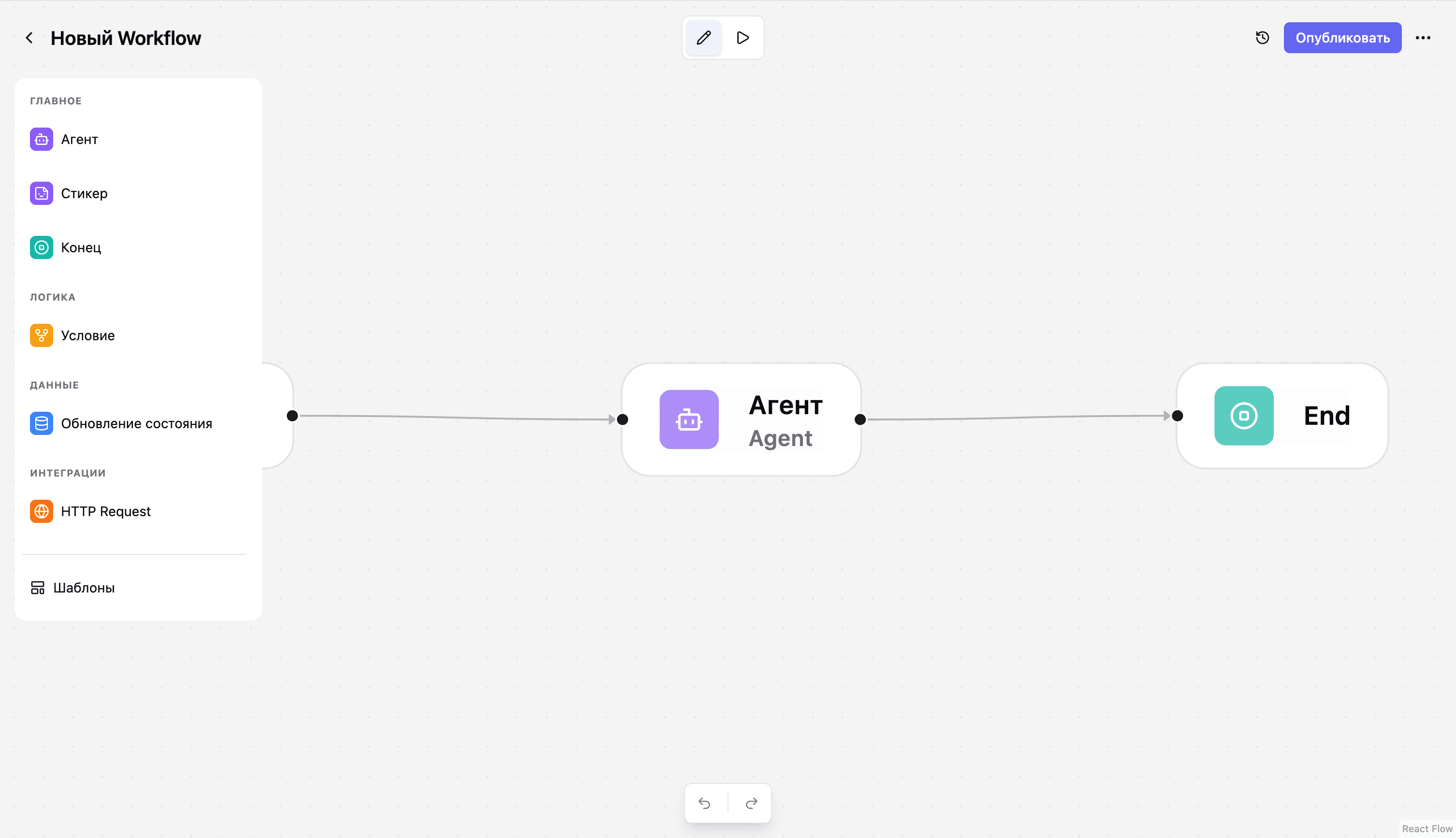
Builder interface overview
The interface has three parts:
Left panel (sidebar)
A library of nodes grouped by category:
- Main: Agent (LLM call), Sticker (notes), End (workflow termination)
- Logic: Condition (branching by conditions)
- Data: Update state (modify variables)
- Integrations: HTTP Request (call external APIs)
Center (canvas)
The work area with nodes and connections between them. By default, the simplest workflow is created: Start → Agent → End.
Right panel
Settings for the selected node. Click any node and a form with its parameters opens here.
Building an assistant agent with classification
Let's build an AI assistant that can detect the request type and respond accordingly. This is a simple example of a system with subagents — a classifier determines the category, and from there you can add specialized agents for each one.
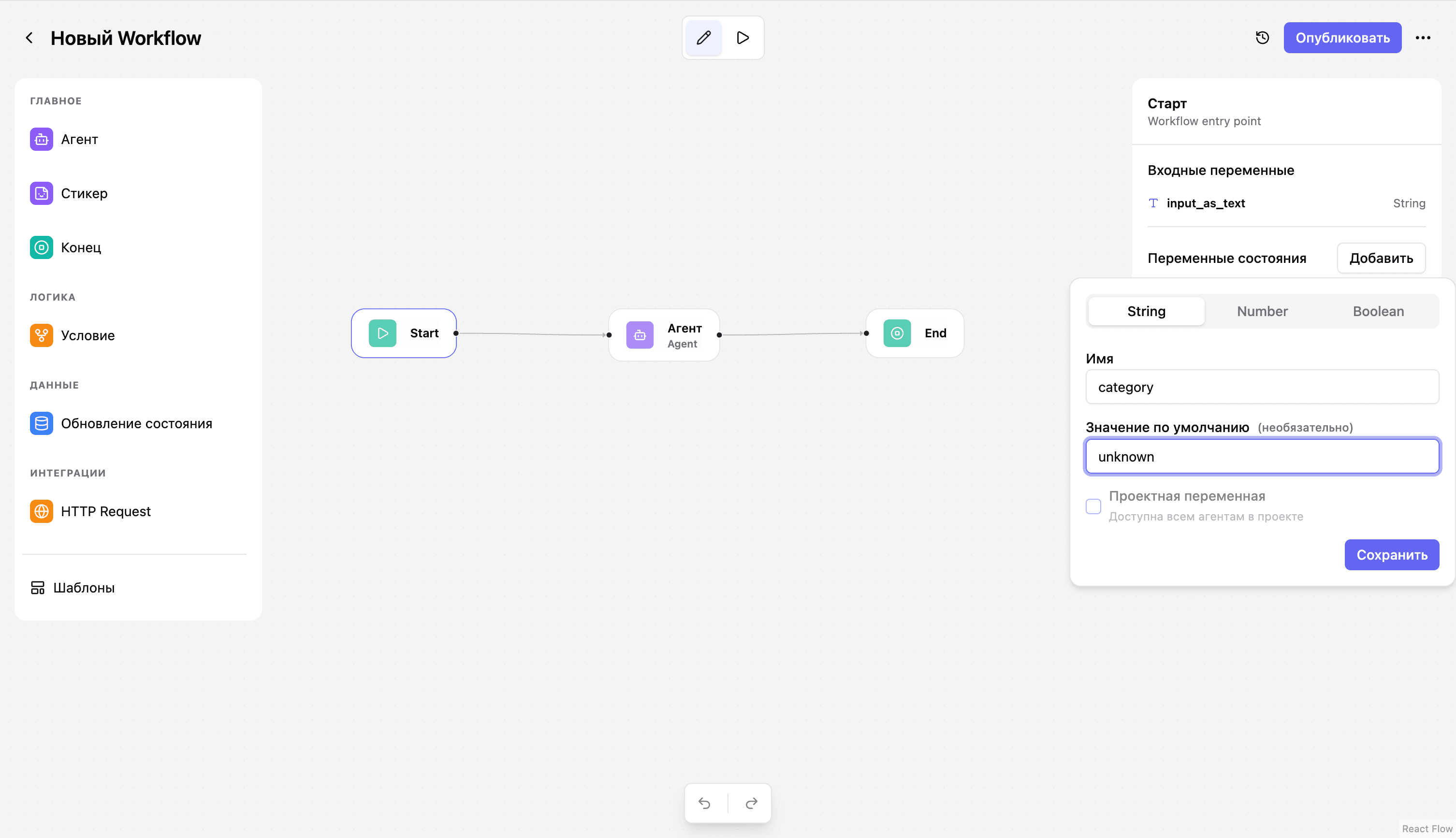
Step 1: Configure state variables
Click the Start node. In the right panel you'll see the "State variables" section — this is where you define the data your agent will store and update during execution.
Add a variable:
- Name:
category - Type: String
- Default value:
unknown
This variable will hold the user request's category.
Step 2: Configure the classifier agent
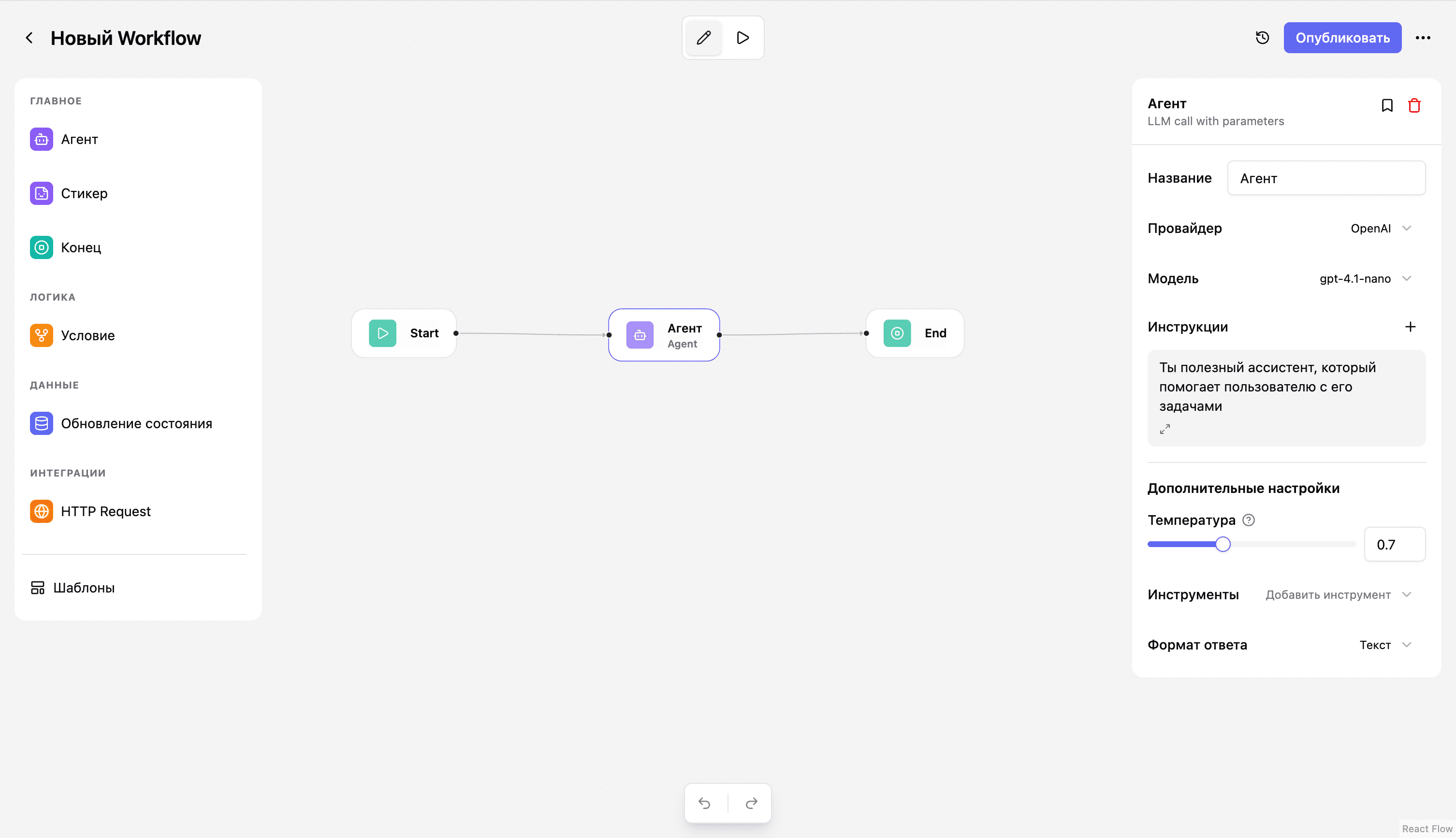
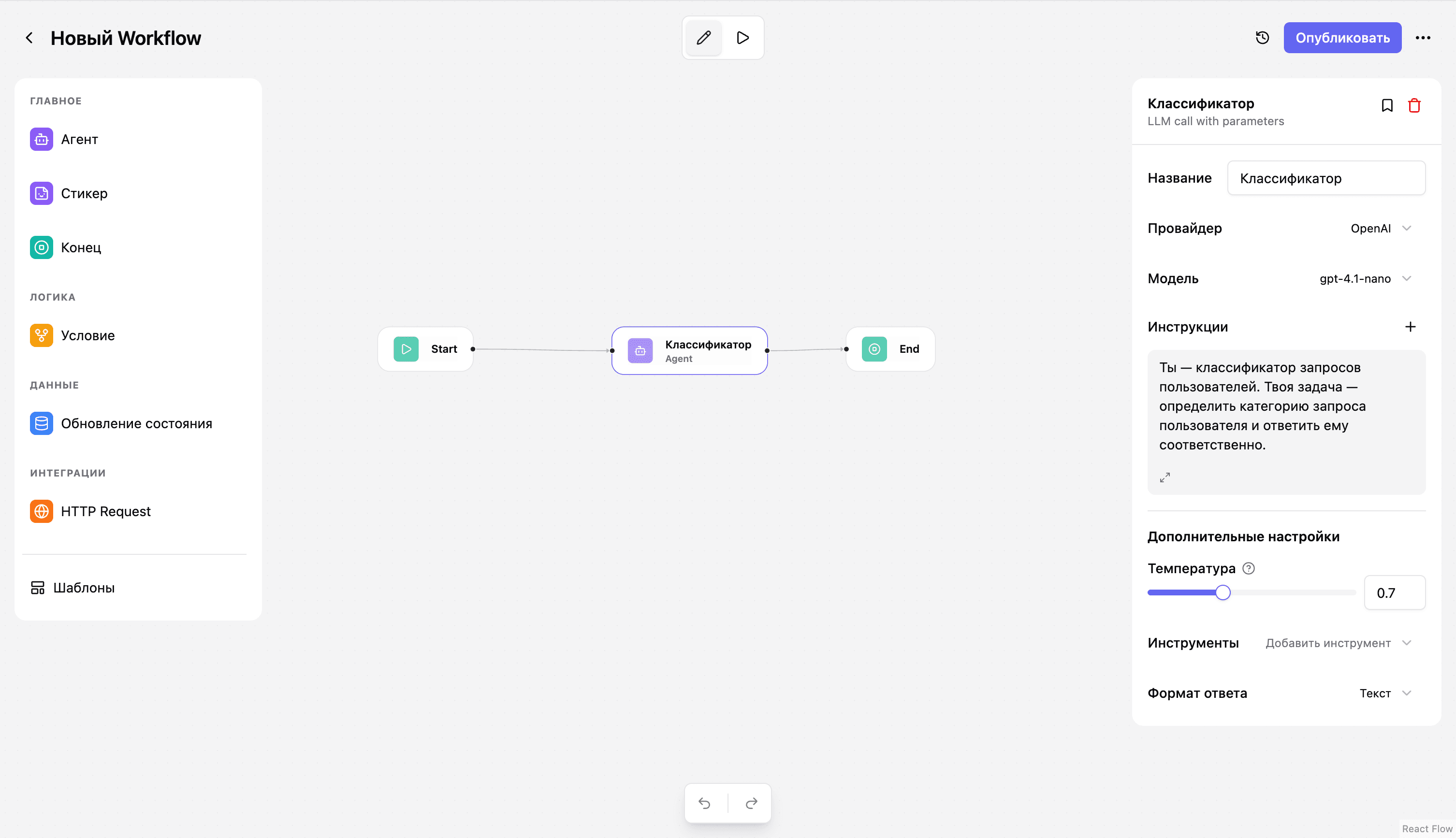
Click the Agent node. Configure:
Name: Classifier
Provider: OpenAI (default — you can also pick Claude, Gemini, GigaChat, DeepSeek)
Model: gpt-4.1-nano (a fast, cheap model for simple tasks)
Instructions (prompt):
You are a classifier for user requests. Your job is to determine the category of a user request and respond accordingly.

Categories:
- billing — questions about payments, pricing, subscriptions
- technical — technical issues, bugs, errors
- general — general questions, product information

Respond to the user and classify their request. At the end of your response, include the category in the format [CATEGORY: name]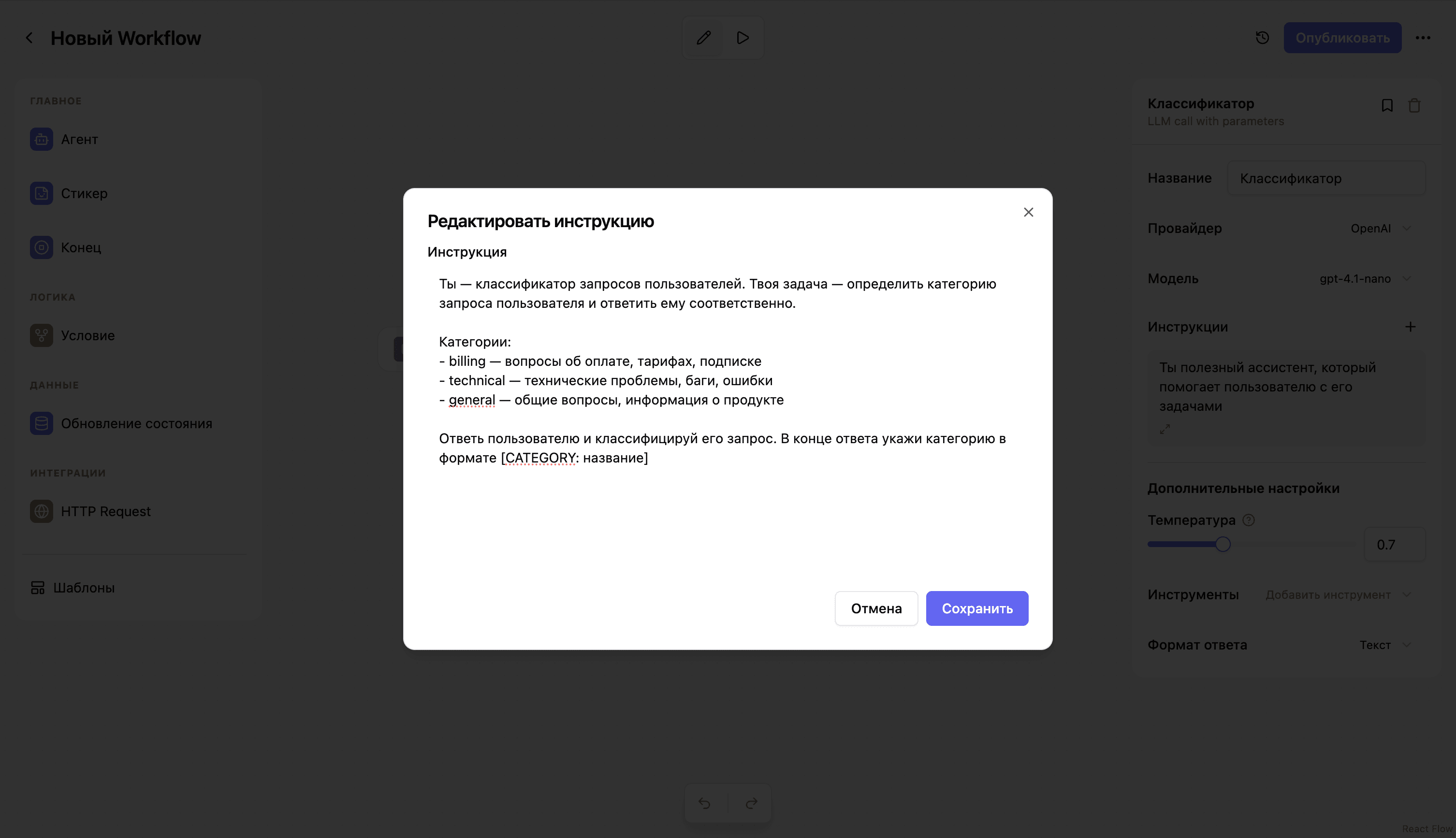
The subagent concept
In our simple example, one agent does both classification and the reply. But in a real system you can:
- Add a Condition node after the classifier — it checks the value of
categoryand routes the flow to different agents - Create specialized agents — one for billing with access to the pricing database, one for technical with a ticket system integration, one for general with a knowledge base
- Use HTTP Request nodes to integrate with your systems — CRMs, databases, external APIs
- Update state via SetVariable — persist classification results, accumulate context
What you get isn't just a chatbot — it's an intelligent request routing and processing system.
Running and testing
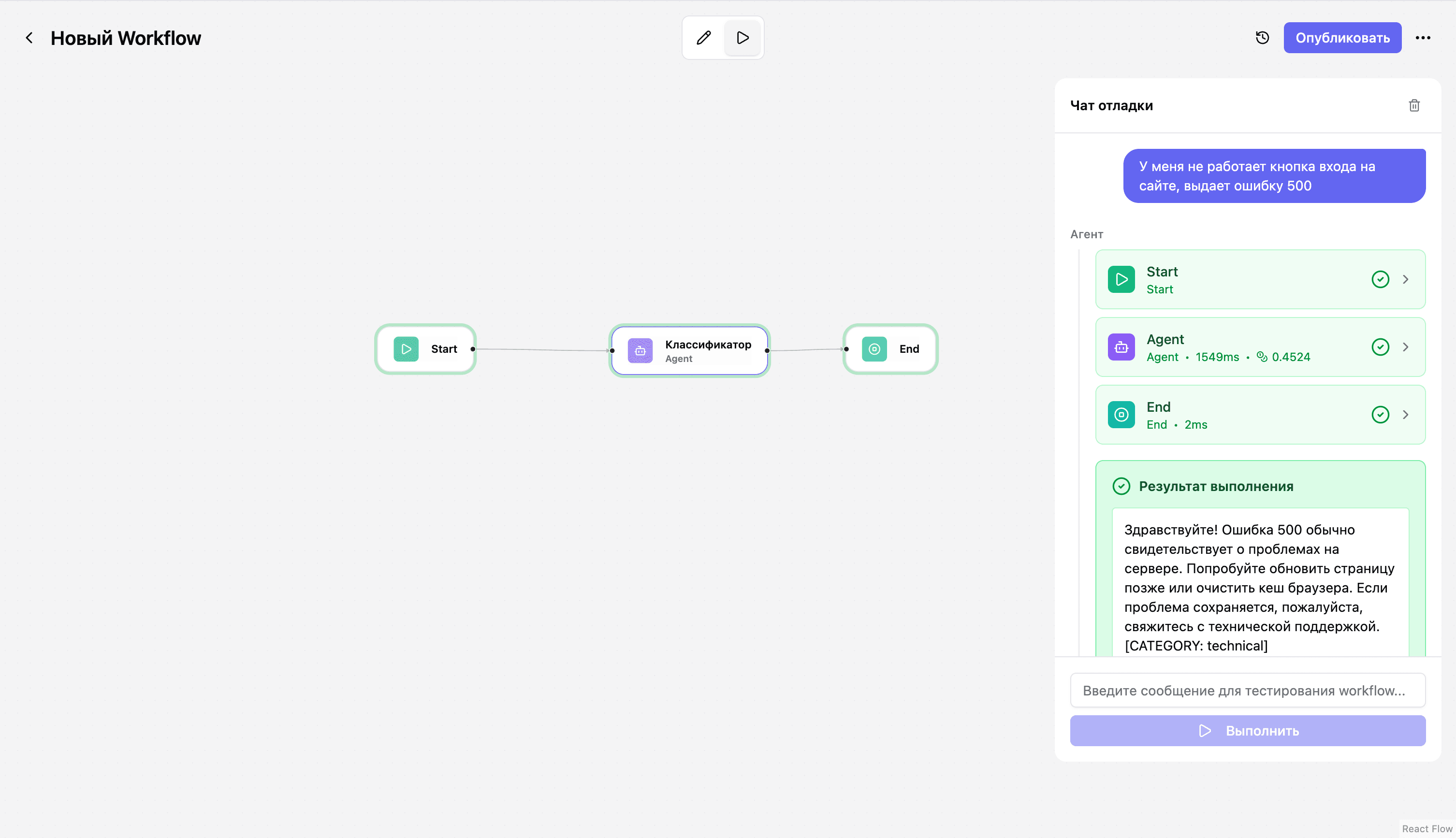
Assemblix ships a built-in debug mode. Click the Play button in the top bar — the Debug chat opens.
Enter a test request:
The login button on the site doesn't work, it returns a 500 errorHit "Run" and watch:
- Execution visualization — nodes light up as they execute: Start (green) → Agent (green, showing 1549ms) → End (green)
- Per-step details — expand any node to see the inputs, the prompt, and the model's response
- Cost in credits — the Agent spent 0.4524 credits
- Execution result:
Hello! A 500 error usually points to a problem on the server.
Try refreshing the page later or clearing your browser cache.
If the issue persists, please contact technical support.
[CATEGORY: technical]
The agent correctly identified the category as technical and gave a relevant answer!
Tokens and credits — no API key headaches
Assemblix uses a built-in credit system, and that changes everything:
- 1,000 free credits on signup — enough for ~200 support conversations
- No need to register API keys with OpenAI, Anthropic, or other providers
- Transparent cost — you see credit spend per request
- Paid plans — from $5/month (5,000 credits) up to Business with 100,000 credits. See all plans
On paid plans (STARTER and above) you can connect your own API keys (BYOK — Bring Your Own Key). In that case you work without limits and pay your provider directly — Assemblix credits aren't deducted.
This is ideal for MVPs and validating hypotheses: start free, grow as you need to, and switch to your own keys when you scale.
Integrate into your products in 5 minutes
When the agent is ready, click "Publish". Assemblix creates version v1 and shows a modal with integration examples.
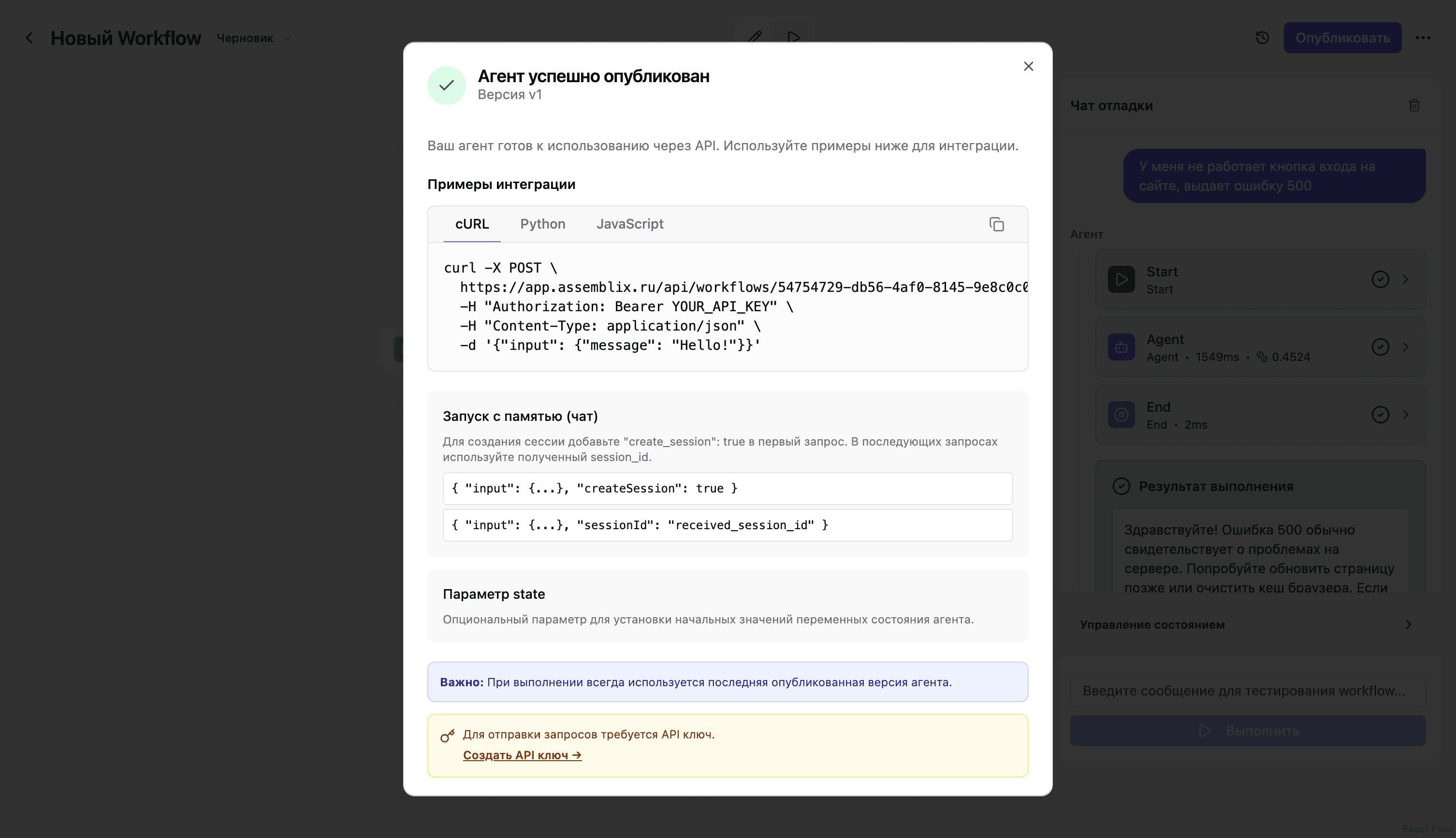
A basic request
Python:
import httpx

base = "https://app.assmblx.com/api"
endpoint = "/workflows/YOUR_WORKFLOW_ID/execute"
url = base + endpoint

headers = {
    "Authorization": "Bearer YOUR_API_KEY",
    "Content-Type": "application/json"
}

data = {"input": {"message": "Hello!"}}

response = httpx.post(url, headers=headers, json=data)
print(response.json())
JavaScript:
const response = await fetch(
  'https://app.assmblx.com/api/workflows/YOUR_WORKFLOW_ID/execute',
  {
    method: 'POST',
    headers: {
      'Authorization': 'Bearer YOUR_API_KEY',
      'Content-Type': 'application/json'
    },
    body: JSON.stringify({
      input: { message: 'Hello!' }
    })
  }
);

const data = await response.json();
console.log(data);
Working with sessions and memory
Creating a session (first request):
data = {
    "input": {"message": "How much does the Pro plan cost?"},
    "createSession": True  # Creates a new session
}
The response contains a session_id. Use it in subsequent requests:
data = {
    "input": {"message": "And how do I pay for it?"},
    "sessionId": "received_session_id"  # Continues the conversation
}
Shared memory across agents via client_id:
data = {
    "input": {"message": "I want to upgrade my plan"},
    "clientId": "user_12345"  # All agents in the project get access to this client's data
}
If you have several agents (a classifier, a sales agent, technical support), pass client_id — they will share history and customer data through project variables.
Where do I get an API key?
Open the API keys section in the sidebar → Create API key → copy the token. Done.
Conclusion: from idea to API in 10 minutes
We built an AI assistant with request classification:
- ✅ Visually assembled the workflow in 5 minutes
- ✅ Configured the classifier prompt
- ✅ Tested it in debug mode
- ✅ Published it and got a ready-to-use API
Without writing a single line of infrastructure code. Without configuring databases. Without registering API keys with providers.
This is the foundation for more complex systems:
- Add Condition nodes to route by category
- Create specialized subagents for each request type
- Integrate your CRM, knowledge bases, and payment systems via HTTP Request
- Use project variables to store customer data
Get started for free at assmblx.com — 1,000 credits is enough for testing and your first hundreds of requests. For more practical guides, read our blog.
📢 Subscribe to the Assemblix Telegram channel — case studies, updates, production insights, and announcements for new articles