Voice assistants
Take the call, answer the question, book the appointment. Sub-second replies mean callers talk to it instead of waiting through it.
voice
Design the whole dialogue as a graph — branching logic, any LLM, your own docs. Run it as text, real-time voice, or a lip-synced AI avatar. And let workflows score every conversation while it happens.
↳The real editor — building a conversation graph, then switching its output to voice and to a live avatar.
A prompt can't hold a real conversation. A graph can. Drag nodes, wire the branches, publish — the flow of the dialogue is the thing you edit, not a wall of instructions.
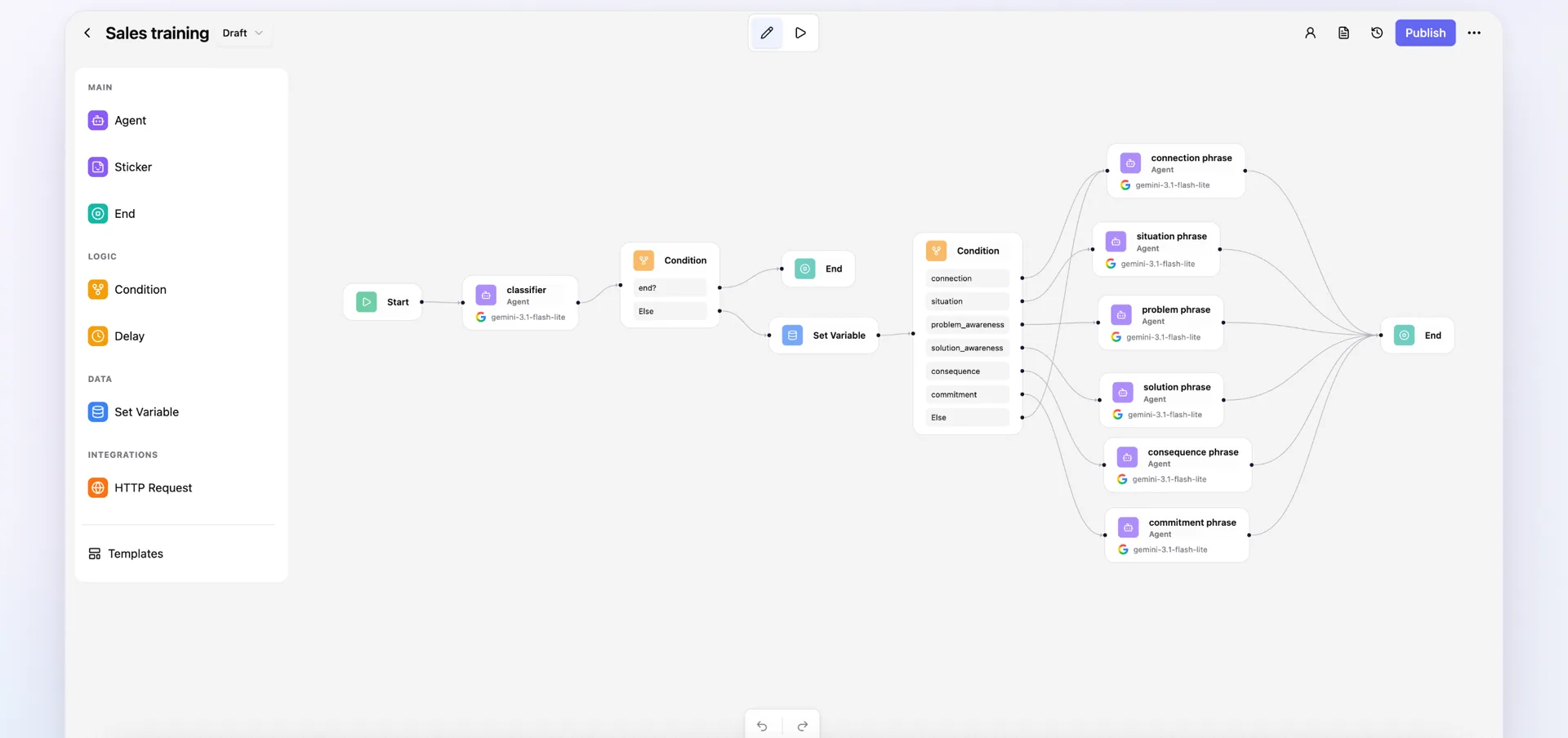
↳A real agent — classifier → condition → six branch agents, each on its own model.
Condition nodes route the conversation on intent, on state, on a tool's answer. Every path is visible, so nothing hides inside a prompt.
Classify on a cheap fast model, reason on a strong one. The provider is a property of the node, not of the project.
Agent, Condition, Delay, Set Variable, Transcribe, HTTP Request. Reach anything over HTTP, then keep going in the graph.
Most tools make you pick the channel up front and rebuild the bot to add voice. Here the modality is a layer on top of the dialogue you already built — a field on the agent, not a second project.
Plain chat replies.
Speaks out loud, streamed live as it thinks.
A talking face on screen.
Realtime streaming
Speak as the agent thinks

Voice input works the same way in a graph — drop a Transcribe node in front of the agent and the workflow takes speech as well as it takes text.
A graph is the right shape for a dialogue you design. It is the wrong shape for a phone call — anything that waits for a graph to finish sounds like someone reading from a script. So a voice agent is a prompt and a voice running straight against a speech-to-speech model, with nothing on the path to the reply.
Read the voice agent docsThe pattern repeats: an agent talks to a person, and the transcript is worth something to the business. Assemblix is the builder for the first half and the engine for the second.
Take the call, answer the question, book the appointment. Sub-second replies mean callers talk to it instead of waiting through it.
Talk to the lead, then classify and score them in the background and push the result into your CRM before the call is even over.
Walk a prospect through the pitch as a branching graph — and grade every conversation against criteria you wrote yourself.
The agent plays the difficult customer. An analysis workflow scores how the rep handled it and hands back the transcript with the breakdown.
Conversational drills and knowledge checks where the agent does the talking and a workflow marks the answers.
Run structured interviews or NPS calls at any volume, then pull structured answers out of every transcript automatically.
Ground an agent on your own PDFs and Markdown, then let staff ask it questions by chat or out loud.
Every workflow is a typed HTTP endpoint and every voice agent has a session API — the conversation runs behind your own UI.
None of these are templates you are locked into — they are the same four layers wired differently.
A voice platform hands you a recording. Assemblix hands you the recording and the engine that reads it — because the visual builder you used for the dialogue is also the one you use for what happens to it.
Each finished utterance starts a workflow, with the agent's previous reply for context — enough to detect intent, catch a complaint, or update a record mid-call.
The full conversation flattened into text plus the structured turns, the duration, and why the call ended.
{
  "message": "user: I'd like to return an order\nassistant: …",
  "voice": {
    "session_id": "vs_8f21c4",
    "transcript": [
      { "role": "user", "text": "I'd like to return an order" }
    ],
    "duration_sec": 74.2,
    "end_reason": "user_hangup"
  }
}Hooks run in the background. The agent keeps talking at full speed no matter how slow the analysis is.
A hook cannot end a call or change the reply. A failing workflow is logged and dropped — it can never break the conversation.
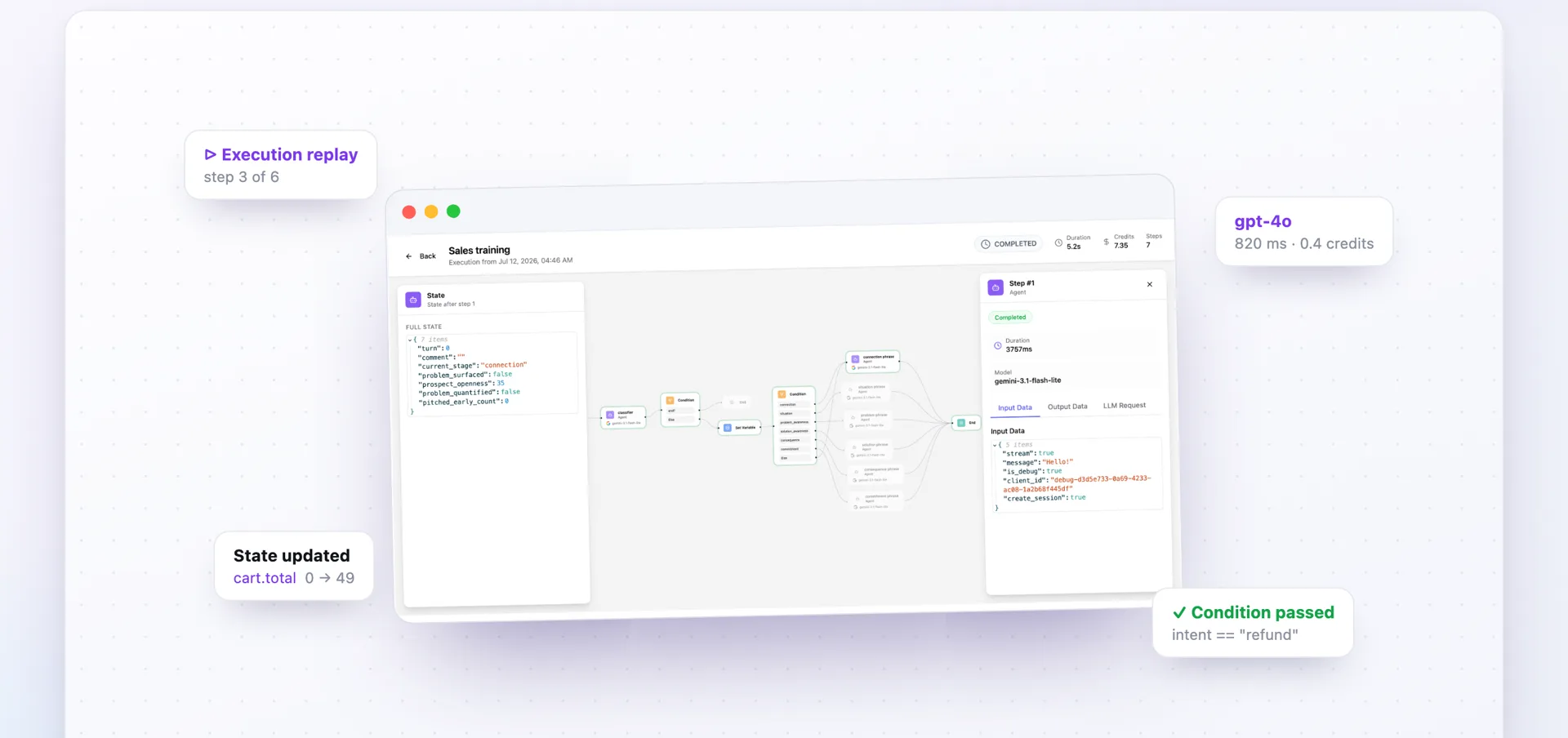
Nothing about them is voice-specific. Build them on the same canvas, run them by hand, replay them in the execution viewer.
Two things separate an agent from a chat widget: it carries context across turns, and it answers from your material instead of guessing.
Typed workflow and agent state carries context across every turn — set it, branch on it, watch it update. The values live in Postgres, so a conversation survives restarts, deploys, and weeks of silence.
Upload PDFs, paste text, attach the knowledge base to any agent. It retrieves over your material and answers with citations — no fine-tuning, no separate vector database to run.
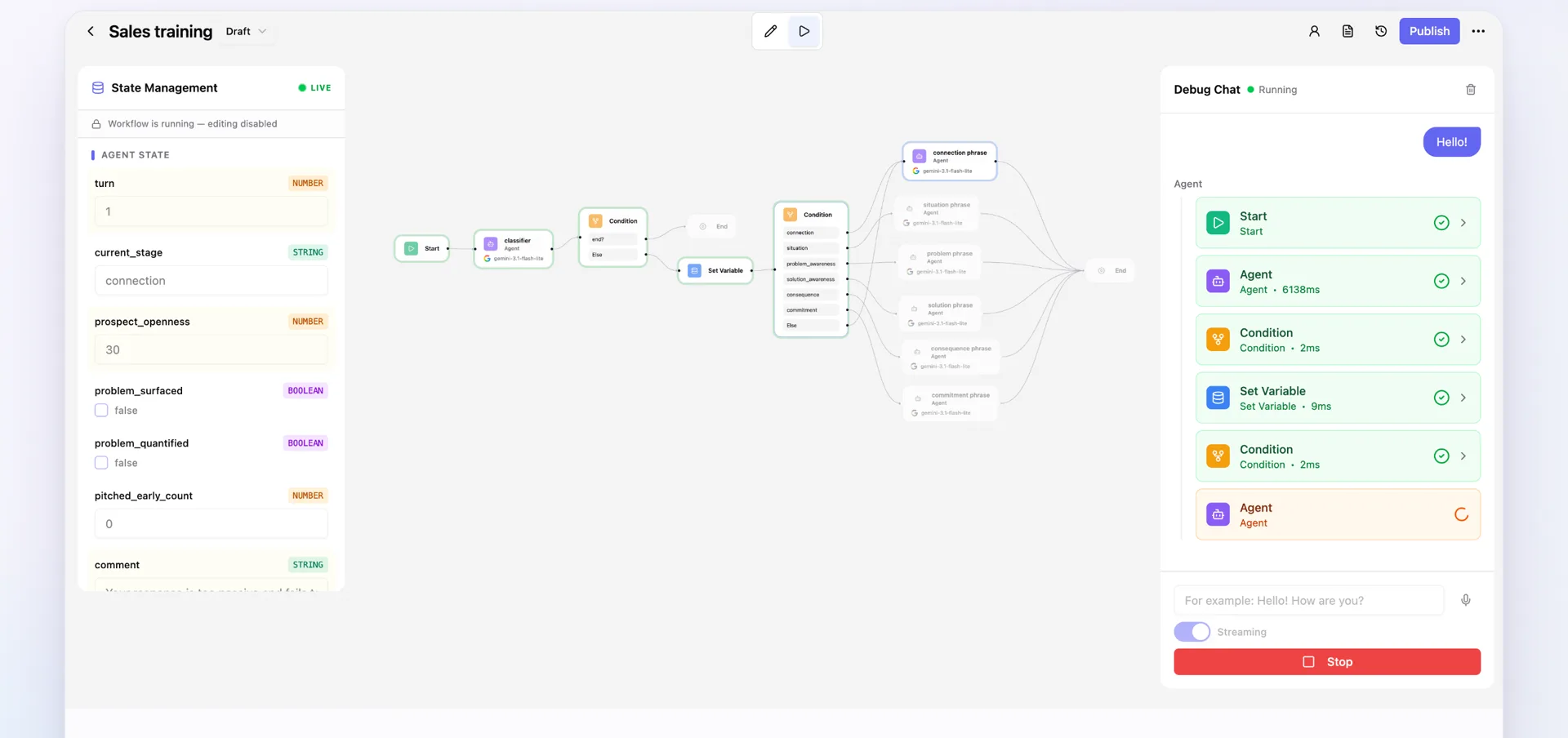
Run the agent in the debug panel — type or talk — and watch each step as it happens. When something goes wrong in production, open the run and walk it back step by step.
Hit publish and you get POST /api/workflows/wf_… with bearer auth and a stable contract. Put it behind your own product, your own UI, your own funnel — no separate deploy, no infrastructure code.
curl -X POST https://app.assmblx.com/api/workflows/wf_a3f2 \
  -H "Authorization: Bearer $ASSEMBLIX_KEY" \
  -H "Content-Type: application/json" \
  -d '{
    "input": { "message": "I want a refund" },
    "state": { "user_id": "u_42" }
}'{
"executionId": "exec_d7c9b585",
"status": "completed",
"output": {
"parsed_message": {
"intent": "refund",
"confidence": 0.94,
"next_action": "check_policy"
},
"tool_executions": []
},
"state": { "user_id": "u_42", "turn": 3 },
"metadata": { "durationMs": 850, "totalSteps": 3 }
}Postgres-backed state · Webhooks, REST, schedules · Every run traced and replayable.
Nothing here is locked to one vendor. Bring your own keys for the model, the realtime voice, the synthesis, and the avatar — and swap any of them without rebuilding the agent.
Bring your own keys · vendor-neutral
Every plan can run on our keys or on yours — there is no tier where bringing your own key is locked. On our keys the provider cost is passed through with a 10% margin; on yours you pay the provider directly and we charge only the platform fee.
Own your stack. Postgres-only core, no phone-home, bring your own keys. Source-available and free to self-host.
Source-available — MIT + Commons Clause. The commercial billing layer is a separate Enterprise license, off by default.
$ git clone https://github.com/nmamizerov/assemblix$ cd assemblix && docker compose up→ pulling images…✓ postgres ready on :5432✓ assemblix-api ready on :8000✓ assemblix-web ready on :3000Assemblix is live → http://localhost:3000
Short, direct answers to the things people ask most. Anything still unclear — ping us on Telegram, we reply fast.
Everything above runs on your own machine at no cost — the whole install, nothing held back, no paywall in the UI. The prices below are for the managed cloud. One meter, one number: a credit is $0.0001 of usage. No seats, and no plan limits how much you build. Run out mid-month and you top up with a pack — $10 / 25,000 credits, $25 / 70,000, $50 / 160,000. Purchased credits never expire.
For prototyping and weekend hacks.
For production solo and small teams.
For scale and heavier voice traffic.
Tell us what's missing — new nodes, providers, integrations land in days, not quarters. Direct line to the founder.
Request a featureFree tier, no credit card. Build the conversation as a graph, flip the output to voice, and hear it answer.